Effective deliberation requires calculation.
This page describes methods for calculating feedback related to the Imbue project.
Coders!
Build Tools to Calculate Merit
Artistic collaboration on this site will include a number of people contributing music, visual art, lyrics, historical events which are all open to deliberation. See Imbue Collaboration.
Site visitors will also be able to feedback and deliberate any element on the site using the semantic screen structure for input categorization. See u4u.io.
People will be able to weigh in about any element toward an evolving shared consensus around anything on the site worth deliberating.
There are two aspects to adding merit calculations:
- adapt the semantic screen interface for user input
- code calculations to be displayed on the interface
The interface and “backend” flow for simple and weighted merit calculations:
- create input method for values for ushin tagged data around a single point
- update the u4u.io interface to create urls – Alex doing
- refactor the u4u.io interface to save tagged and weighted data using another method, e.g. wordpress forms or new webapp – ?
- assemble data using any readily available spreadsheet, e.g. wordpress plugin
- arrive at a simple average value for all weighed points within a single semscreen
- display the calculation and its result in the merit region of the semscreen
- create a way for these calculations to be part of the metadata for each shared semscreen
- display these single values in the list of peers in the right panel
- aggregate simple averages from multiple semscreens to arrive at a crowd-sourced single value
- display the crowd-sourced single value, which may change as user removes and adds peers included in results
- create input method for users to apply weights to their input categories, e.g. facts valued more than feelings or v.v.
- code a way to arrive at a weighted average using weighted shape categories
- display the crowd-sourced weighted average instead of the simple average in the merit region
- create a way for user to toggle between weighted and simple averages
See below for descriptions of these initial steps and how they may be elaborated with completion scores and varied displays of results.
Deliberation with simple averages
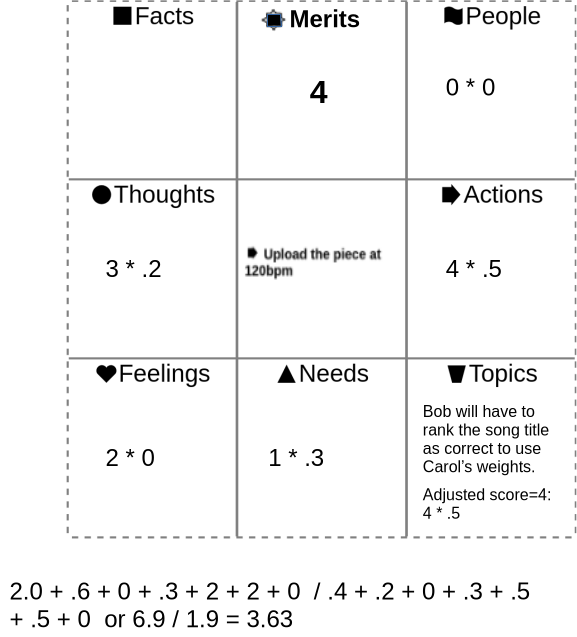
Let’s say that Alice suggests that an Imbue tune be uploaded at 120 beats per minute, a faster tempo, and she supports her request with a semscreen.
Bob applies a score to her supporting points. The resulting average appears in the Merits region, top center.
Deliberation with ranked shapes
This site intends to explore a new feature of ushin deliberation, the setting of relative values to kinds of information. Users will be able to rank a shape’s level of meaningfulness, or meaninglessness, if any.
Averaging ranked merits
The merit given by a single peer for the main point of another peer is an average of the products of that peer’s evaluation of supporting points, considering the weights that the peer assigns to the kinds of points, each labeled with an ushin shape. This is then influenced with a factor for completion considering how many of the potential 7 shapes were completed.
Peers give merit to main points by ranking the supporting points
Merits are given to published points. Peers cannot give merit to their own points before publishing them, as the merit field is not present until points are published.
- Single (supporting) point merits (SPM) are assigned by peers from 1-5, in this iteration by clicking on 1-5 stars adjacent to each of 7 fields, each representing a shape, or kind of meaning associated with the field, each representing support for the main point in center.
- Main point merit (MPM) is a product of the single point merits (SPM) and the shape weights that the peer has given various ushin shapes. When a peer doesn’t rank shapes, then the MPM reveals a simple average of all supporting points given by a peer for the central, “main point” of a semantic screen (1 to 5 stars).
- Shape weights (SW) show user preference for individual ushin shapes which quantified for each of the seven fields. In this iteration the peer does this by selecting individual shapes to usher using the semantic screen and following prompts in the merit regions for assigning a value form 1-5. Users will be prompted by qualifiers to consider and text input box(es) to add one’s own considerations, full sentences …
- Qualifiers such as importance, relevance, urgency, creativity, originality, beauty and recency are displayed as drop-down lists or tag clouds for users to select. in this iteration they are appropriate to the Imbue project. The site also provides input fields for site visitors to add shape qualifiers on the fly. In the future these valuations may be similarly “ushered”for further deliberation.
- Peer Completion Score (PCS) ranges by default from 94% to 100% based on the number of fields completed, from 1 to 7, as there are 7 fields, one for each ushin shape.
A single merit score for a select community of peers is averaged from main point merits, which, again, derive from averaged weighted single merit scores:
- Community Point Merit (CPM) shows the average rating published by all of the peers that a site visitor custom picked to weigh in about that main point. The software will store which rank goes with which shape for clarity and further deliberation.
- Community shape weights (CSW) for each shape are published by peers to rank shapes individually as with individual shape weights, above. These weights are rolled into the Peers’ Merit Score and thus into the average for all peers included. The individual shape weights will be saved for evaluation and display.
- Peers’ Completion Percentage will likely be folded into the average peers’ score because the averaged individual peer’s final score will factor in completion by default. The reason for this is to model the encouragement of more comprehensive deliberation which may be useful in future iterations of the ushin merit methodology.
Completion Factor
- Submission requires at least one field to be filled
- Score goes up the more fields are filled
| Number of Inputs Filled | Score (%) |
|---|---|
| 0 | locally saved |
| 1 | 94% |
| 2 | 95% |
| 3 | 96% |
| 4 | 97% |
| 5 | 98% |
| 6 | 99% |
| 7 | 100% |
Peer selection of other peers to include in merit ranking
Each peer on the site selects which other peers are included in the calculations. In this iteration the display will show all of the peers which have contributed, as curated by the site. Site visitors using the ushin tools will be able to view different results by specifying which peers are included. Future extensions, here or run by future hosts, may allow users to rank, promote or remove other peers. Initially the Imbue site will consider all peer input equally. In the future this site may explore shape weights for individuals when deliberating a musical fragment. For example, the original songwriter’s feelings might be up-ranked by users or the site. Supporting factors may also, in future software versions, be potentially detailed and ranked for further deliberation.
How a single peer changes a community merit
The site will show the change in overall merit when a single peer is or is not included in the peer list findings.
- Community merit before user inputs merit
- Peer merit added
- Community merit after user inputs merit
Single Peer Calculation Examples
Where p:people; t:topics; n:needs; e:emotions; t:thoughts; f:facts and m:merit
——– EXAMPLE MERIT CALCULATIONS for a SINGLE PEER —–>
Average Weighted Stars/Shape (AVS) |
Shape Weights (ShW) |
Stars per Shape (SPS) |
Completed Fields (CF) |
Completion Factor (CF%) |
Final Score Calculation (FS) |
Adjusted Merit (AM) |
|---|---|---|---|---|---|---|
2.5 |
[1p] |
[3p] |
1 |
0.94 |
2.5×0.94=2.35 |
2.35 |
1.0 |
[1n] |
[1n] |
1 |
0.94 |
1.0×0.94=0.94 |
1.0 |
4.0 |
[2a, 3t] |
[4a, 5t] |
2 |
0.95 |
4.0×0.95=3.80 |
3.80 |
2.5 |
[1n, 1e, 1f] |
[2n, 3e, 2f] |
3 |
0.96 |
2.5×0.96=2.40 |
2.40 |
4.0 |
[1p, 1a, 2t, 2n] |
[5p, 4a, 3t, 1n] |
4 |
0.97 |
4.0×0.97=3.88 |
3.88 |
3.0 |
[1n, 1e, 1f, 1t, 1a] |
[1n, 2e, 2f, 3t, 5a] |
5 |
0.98 |
3.0×0.98=2.94 |
2.94 |
5.0 |
[1p, 1a, 1t, 1n, 1e, 1f] |
[5p, 4a, 3t, 2n, 2e, 1f] |
6 |
0.99 |
5.0×0.99=4.95 |
4.95 |
4.0 |
[1p, 1a, 1t, 1n, 1e, 1f, 1n] |
[3p, 2a, 4t, 1n, 5e, 2f, 3n] |
7 |
1.0 |
4.0×1.0=4.0 |
4.0 |
1.0 |
[1p] |
[2p] |
1 |
0.94 |
1.0×0.94=0.94 |
1.0 |
3.5 |
[2e, 2f] |
[3e, 2f] |
2 |
0.95 |
3.5×0.95=3.32 |
3.32 |
- Average Weighted Score (AWS): Average score (1-5)given by a peer across fields 1-7,
- Shape Weight (ShW) Factor weighted by peer according to the importance assigned by the peer.
- Completion Factor (CF): Number of fields completed by the peer. For example, “7 (100%)” means that all 7 fields were completed.
- Adjusted Merit (AM): Overall user score that takes into account the weights of each score and their respective completion percentages.
Single and Community Merits
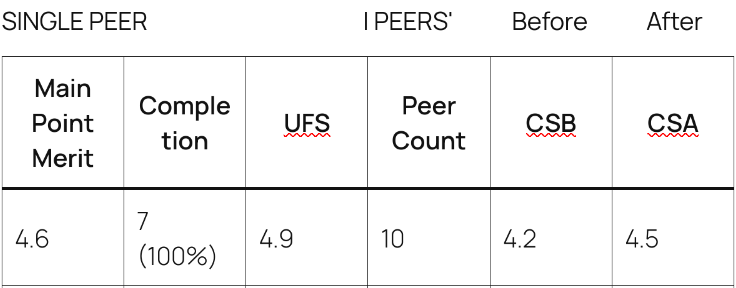
Example results. Compare the first and last columns to see how a single peer evaluating a point changes the community merit for the selected set of peers.
Community Metrics:
- Peer Count: Number of peers contributing to the community metrics.
- CSB (Community Score Before This Peer): Average community score before considering the contributions from the user, based on previous inputs from the community.
- CSA (Community Score After This Peer): Updated community score after integrating the user’s contributions.
- CSB and CSA are calculated based on community data. While formulas may vary, on this site, Imbue, final peer scores will include peer and completion weights and then average final scores by the number of peers contributing merits to the point.
Custom weights
In the future peers, groups and publishing hosts could, for example, remove a shape’s valuations from results, or re-calibrate point merits using different factors, applying different limits such as kinds of fact citations or peer qualifications.