Songs
- List of songs, accordion style, within each:
- Audio of each arrangement e.g. mp3s to play from site
- Score, lead sheet, images
- Display list of separate arrangements for free use including collaboration with the imbue project (in common DAW format for user collaboration or open other use)
- Input specific to the four Oratio songs, each a verse
- Each verse suggests a different object and method for collaboration/deliberation
- An object may be. a snippet of lyric, interval of audio, track or arrangement, or tagged marker, or image, and once deliberation systems are mature, a depth of discussion with interaction at the level of sub-sub-points and their connections …
Verse: Rosetta Stone – seeking historical facts
- Form with input fields for facts and subfacts related to historical events
- date(s) and intervals of time
- common name(s) of event
- related facts and subfacts (children and grandchildren… n “hops out”)
- cited with standard formats
- introducing timeline with adjustable marker for place in time of event that +/- shows name of the event when hovering the marker
- introducing timeline with adjustable marker for place in time of event that +/- shows name of the event when hovering the marker
Verse: Exodus – seeking published stories as kinds of facts
- Form with input fields for facts and stories of any kind related to “going cimarron”, or escape from slavery
- all story titles are input as “facts”, (the only available field for the main point input )
- as with other facts, citation is necessary for publication on the imbue.im site in this experiment
- story publication links may include any outside links as well as links to pages on the imbue.im site
- introducing personal experience as a citation label
- subpoints may be tagged with other ushin shapes
- introduces the semantic screen for automatic tagging of text with a shape based on which blank text field the user types into
- may have other semantic screen features, see u4u.io
- Expands features of interactive timeline such that the time itself may be a focus of deliberation
Verse: Awareness – seeking psycho-spiritual input
- Form with input fields accepting all ushin shapes, i.e. thoughts, feelings, needs and other shapes
- supporting documentation may be published by the site
- documentation may include text or other objects that may be annotated show ushin shape and commentary
- other songs, contributions and alternate lyrics, fringe contributions and independent art and software may be showcased
- display shows specified labels to tag points and subpoints for appropriate connection with the project and its deliberations
Verse: Deliberation – seeking multilevel exploration
- Online forms may merge into, and the site is likely to suggest other technologies with advanced deliberation features, e.g. cross-referencing, discovery, interoperability, p2p technologies …
- This instance of ushin is hoped to exemplify host-based collaboration and will explore WordPress as a model for website deliberation and potentially interoperability in a platform-agnostic deliberation protocol.
- Possible WordPress extension
- offer ushin tools
- find, compare, rank and share
- display ideas:
- use WordPress forms for users to submit ushin-tagged points
- Semscreen-like deliberation input
- A focus called a “central”, or “main point”
- Each main point has up to 8 kinds of supporting points at the top level: the ushin shapes
- Each shape has its own set of subshapes
- offer ushin tools
- Possible WordPress extension
- Community deliberation has ranking methods
- ranking a point’s merit
- points are ranked by other peers
- e.g. someone with a different peer “hat”
- qualifications and types of different peers may be included by hosts as part of their submission requirements, and may make the results public. e.g. hosts may develop ranking systems to add merit for points with larger numbers of differently qualified input sources
- hosts and peers create criteria for publishing input, or posting a shape in the peer group
- criteria are displayed as shape-specific labels with definitions, descriptions and examples
- labels within shapes may be ranked,
- e.g. fact input fields might require a label, such as a citation type, recency of publication, review or quality of publication …
- merit valuations can given to labels, kinds of data, sources with certain credentials
- certain credentials may also disqualify a source from a group
- readers could toggle the display of results based on selection of peers or kinds sources or citations, or shape and shape label
- for example, a deliberation about lyrics in a verse of the Imbue.im oratorio may include only selections of lyrics as main topics of deliberation.
- shapes can be ranked
- readers may want to scan feelings as a priority, or exclude everything but facts, or prioritize certain sources of information
- thoughts may bring value into the negative when found to rest on a logical fallacy, which could then be deliberated and possibly bring a dissed point back into view
- emotions and nuances of feelings including conscience
- e.g. Imbue
- Peer groups may require a token for submission for publication in a peer group
- Tokens may be offered on a site, like imbue.im, that displays the free host ushin tools, e.g. u4u.io, u4fe
- A host token displays a page with an input screen, lists of other input, and tools to submit input for deliberation at specified other points or selections.
- points are ranked by other peers
- ranking a point’s merit
Output content t.b.d.
- Imbue.im to publish deliberations about the project’s art, e.g. lyrics, tracks, arrangements
- Imbue.im to post criteria for publication, e.g. shapes sought for the different oratorio sections and labels acceptable for publication here
- Imbue may provide project-related resources for artists to edit, share, copy, download and save findings, filters, find peer groups
- e.g. the site could list related groups and deliberation topics so visitors can find and connect with peer groups that are related to the imbue project and deliberations
Display t.b.d.
- Display related to available technologies and input sought by the different verses of the Oratorio.
- hierarchical, like bulletin-board style commentary
- mind map
- static and Freeplane-Roan style
- display based on content (see mind map styles)
- e.g. historical cause and effect may use a tunnel map
- comparisons might use a double-bubble map (or table)
- semantic screen, “semscreen”
- see u4u.io
- see additional features on dev.ushin.org
- to be the primary display by the time there is a distributed system for connecting points
- submission requires relevance reference to oratorio
- selected object, e.g. a snippet of lyric, interval of audio, track or arrangement, or tagged marker, or image, sub-sub-point …
- Each supporting point has a ranking tool
Shapes and Semantic Screens
- semscreen for consistent sorting of information in a number of spacial placements for ease of viewing digitally and for recalling for personal considerations, e.g. mental or interpersonal ushering
- show user Input as with u4u.io
- display of ushin icon enlarged showing a button for each shape – [pending floating icon image]
- display shape meanings – see dev.ushin.org
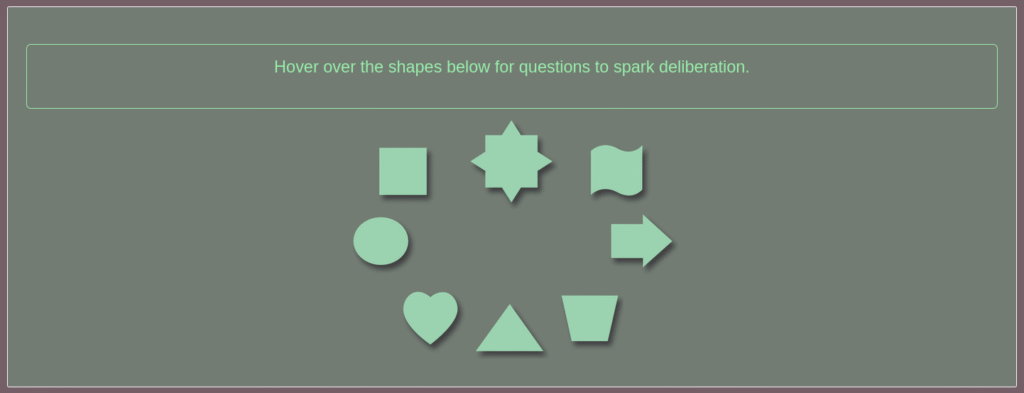
Ushin – a workflow:
- user selects a shape
- text box appears in the shape region, or with shape annotating object on a webpage
- input text may be blank, or autofull a selected object
- annotation style
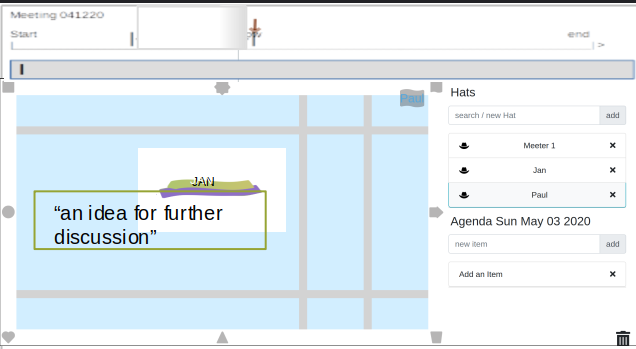
Example of timeline at top of screen
- adapt for the history timeline for people to an add an event
- click on timeline icon at mid top of screen to expand
- display full width time line and horizontal scroll marker
- marker shows large font date at point along timeline
- Note, the image is from a small group program, u4few, showing the timeline of meeting
To display:
- Peer lists
- Peer filters