The landing page will promote musical collaboration, see Feature Requests for Interactive List of Songs, Versions and Snippets.
List of Songs
Each song to offer visitors options to possibly:
- listen to each tune, or play in order
- view lead sheets and oratorio scores
- play backing tracks with lyrics for karaoke
- customize the playlist and illustrations
- upload and download in musicxml format
- upload and download illustrations
Illustrated Libretto
The illustrated libretto will follow the music and user can open lead sheets, karaoke and community videos. It plays like a video playlist that people can switch out illustrated songs, versions and snippets. Still and video snippets can likewise be swapped, edited with user software and uploaded as audio, video and image files.
Collaboration and Deliberation
The WordPress site will experiment with site visitor participation in Imbue project collaboration and deliberation.
USHIN deliberations are typically displayed using a 3×3 grid layout that shows 8 kinds of information, each symbolized by a shape and a region of the screen. The consistency of meaning and screen region help users readily find what they seek through different iterations, platforms, as well as simplify mutual understanding and thorough contemplation.
This site will display the typical semantic screen.
- See u4u.io for basic semscreen appearance and behavior.
- In this iteration the semscreen being deliberated is in the forefront.
- 8 cells of the grid show the author’s color. [It should have a light of the author hue throughout the cells except the top middle, unlike the sketch.]
- The Merits cell is the background color of the peer who is evaluating the main point, visible in center.
- Evaluate the content of each region, or shape, by selecting different numbers of stars and watching the weighted merit value change in the Merits region.
- The size of the stars reflect the relative weight given by the community, and should appear in front at the edge of each shape region (except merits).
- Click the gear icon in Merits to see and adjust the calculations and parameters that show in the Merit region, even expanding it if there is sufficient data. See Imbue Merit Calculations.
- Lists headers have down arrows that open drop-down menus effecting content or order of list content.
- Sort, remove and add peers on the right upper list by DND or flick, or other gestures and buttons.
- Select options at the “Next” or “Action” list in the middle on the right. These include shapes, shown here, or save, or publish the semscreen or merit.
- The bottom list on this site, in the topic region, includes only Art, in this case Song is selected, other options would be versions, or illustration.
- A right (collapsable) panel shows 3 lists, from top to bottom:
- Peers, who are site visitors who have contributed songs, snippets, tracks or participated in deliberation about them.
- Next, the Imbue site’s label for actions people can take with their semscreens, such as create, edit, publish, and add merits to others’ input.
- Art, the Imbue site’s label for songs and illustrations that are uploaded to go along with the score.
Mockup of semscreen layout for Imbue.im
In this example a participant, or peer, named Alice, published a suggestion to pick up the tempo of an entire song. Her semscreen is (or should be) all yellow, Alice’s selected profile hue. Taking prominence front and center it is the current focus of deliberation. Bob’s collection of two other peers besides Alice display their names and colors in a peer list on the upper right panel. These reflect everyone in Bob’s peer groups who published on the topic. Alice’s input may be toggled in and out, see below. The community had given Alice’s suggested action a merit of 4.7 , before Bob weighed in. The following mockup shows Bob’s screen as he is assigning stars with questionable math. Bob gave 5 stars for Alice’s facts and topics, 4 for her actions, 3 for her thoughts, 2 for her feelings, and none for other shapes. His vote raises the merit from 4.7 to 4.8. The merits region could display the breakdown of scores before and after Bob weighs in, results changing as user up- and down-ranks weights of shapes themselves.
Note the backgound colors are specific to the participant who selects that color, with a pattern, and/or “hat” – see mockups of u4few, the conceptual ushin instance for small group deliberation.
Five Star Sliders
Apologies for the rough sketch, below – its colors and numbers are bit off:
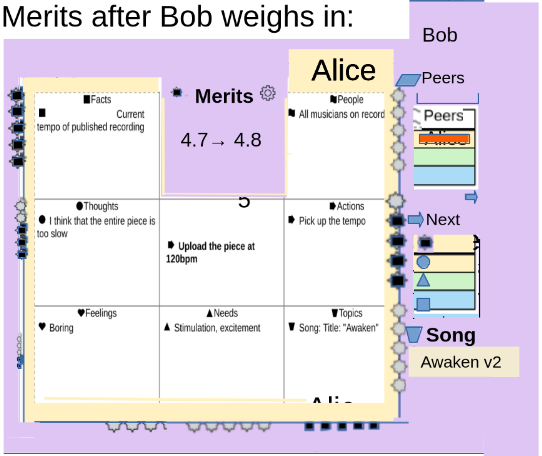
See Imbue Merit Calculations for the math.
Views – – note * if future:
Toolbar in merit region – opens to show minimized shapes and their contents in periphery, and large screen views
- outline
- *topic map
- *mindmap
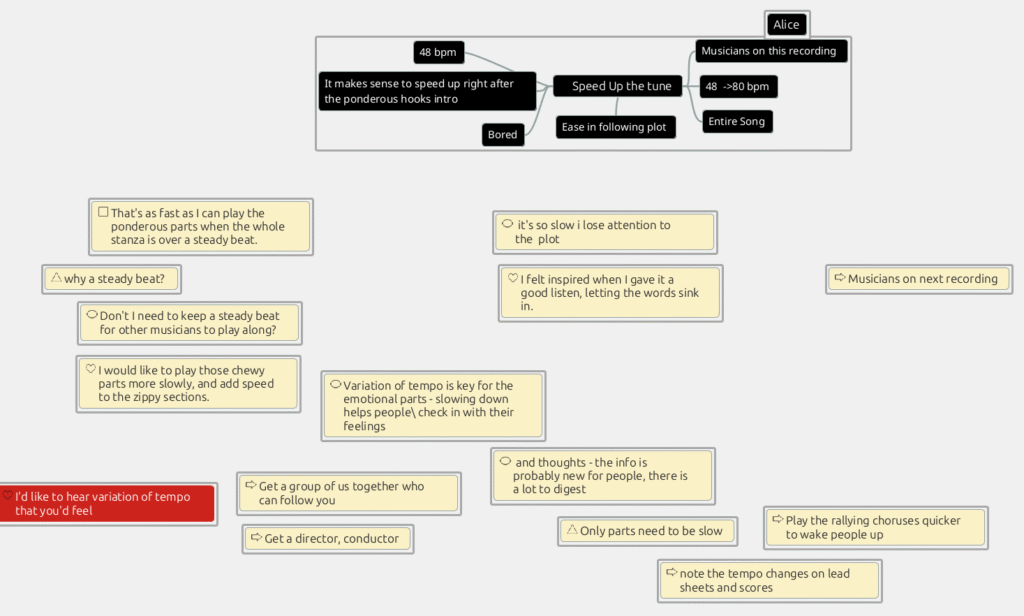
- with connectors, like Freeplane
- 3D like
- *findings – opens list r panel
- recency
- related to _[]_
- per shape
- click on region
- *annotation
- select url or highlit text
- click on ushin icon
- floating
- after selecting object on the site
- show icon at cursor
- after shape selected enlarge that region
- after – sec – semscreen opens
- cursor in a text box tagged with that shape
- checkmark to package
- click on ushin icon
- select url or highlit text
- *merit rank (in merit view0
- see merit below and sep pages and dev.ushin.net
- *package view
Package
- shows after semscreen check mark selected
- (prior to submit)
- semscreen in focus
- interactive shape icon
- select all and submit
- review each shape included:
- lists
- e.g. needs, feelings
- *custom lists
- *filters used, suggested, for this point
- e.g. date, peers and peer groups included (number of hops)…
- topic tags
- musicxml metadata for songs
- lists
- select typical check mark for url, or *share icon
- imbue.im/[person’s uuid/songname, snippet data/
- *select server/protocol/platform/source/channel/pod/app/client(e.g.email)
- note only the hosting site, imbue.im gets the input for now
- *server responsible for API, plugin etc for their own interoperability
- *views show markers choices
- *e.g. in findings view, the jumping-off point
- *where the cursor was last
- *text box input
- *item in list
- *filters
- *encryption or not
- *requirements and process for publication on imbue.im to be elaborated.
- *public collaboration
- main point ushin shape and content
- published here, at imbue.im, song name, version, entire song or interval(s) selected
- main point shape in focus
- select top # characters to show when semscreen regions are small
- date, time stamp
- *token-based
- *+/- separate points, links, e.g. large files
- *view and select, create, labels, descriptors, qualifiers
- *add qualifiers
- *feature requests with imbue.im merit
- *updates
- *usher qualifications
- *u4u ushers are the opposite of trolls. They prune connections according to published guidelines, filters, deliberation criteria and site taxonomy.
- *ushers do this by adding or subtracting merit with qualifications displayed
- *ushers, anyone will to connect semscreen points from different semscreens to help people find each other
- *deliberating points
- main point shape in focus
- * for mature system, after user selects people to receive
- *connect to a published point
- user view/DND/tap in sequence… to select where the snippet to be connected
- for specific meaning
- specifying views to allow
- moving to another connection point
- clarification
- finding by association
- including multiple connection points (? separate labels)
- *federated and independent network nodes/publishing hosts/instances/relays/personal pods
- user view/DND/tap in sequence… to select where the snippet to be connected
- *connect to a published point
- unequal points, or alternative options to the main point deliberated
≠ - host curation
- Imbue.im model guidelines, requirements to post, publication options
- hosts to reject inappropriate contributions, e.g. Imbue.im curating information only connected to Imbue-related art on the Imbue website.
- * through u4u in browser or other u4u instance to come, people choose source to publish information.
- *user can select via their identities on current or other server, e.g. a pod or group, or self-hosted …
- *note: unless using interoperability protocols, federated or connected, ushin tools may become orphans and popular servers may develop which are likely not come to our attention or be of use to site visitors here
- *relationships among peers, hosts and groups using ushin are free to connect around exchanges and transactions independently of USHIN, Inc. or others who display the ushin tools as described here and on the public git.
____________________________________________
-> review for features appropriate to imbue.im and remove others to dev.ushin.net
The follow have not been reviewed or integrated with vision since 2019 or older. It’s a hodge-podge of ideas pending triage.
- see USHIN maps for people and groups doing similar projects
- https://pkp.sfu.ca/
above adapted from 2019 : in U$U Documentation Active Slides – look for .mm in USHIN Programs?
u4u Feature Map to prioritize, updating to u4u MVP features, still active 042019 – cut and paste to u4u Slides
Feature Priority Map 0302319
from Master u4uDemo 032019
READ ONLY
for updating github, BOD and budget
See Master u4uDemo – added to May 6 2018 for demo plot
- General overview of semantic screen
- General overview of semantic screen – oh no this is probably not a dupe – compare
- Behaviors for all shape
- Users will be able to usher (add points to create and publish input) these labels or connect them to clones or create other relationships among relationships.
- Before saving your input you can bold the words you want to show up first
- Specific Shape Behavior
- Facts
- the only tag requiring citations (check off: self, link, document, other)
- Time
- User wants to schedule an event
- Show it turn the arrow into a long band from now’s date and time into the future: this week,
- to the right next 3 weeks each a vertical color, the next 11 months
- (calendar features in common with 1ata simple reminder app)
- Show it turn the arrow into a long band from now’s date and time into the future: this week,
- Calendar
- User wants to schedule an event
- See chomsky scarf facts box
- Merits
- Displays user ranking of tags, sources and content
- By importance – show size; relevancy – show proximity to center; show urgency (time line appears) and show popularity:
- Merits are determined largely for actions that are projected to meet needs that are cooperatively ranked and filtered by user and selected soruces.
- Topics
- List topics to elaborate in the first iteration of the widget
- Topics (listed and identified as dead links for now) to elaborate next
- Actions
- This tag signifies a to-do or event in the future
- Show it turn the arrow into a long band from now’s date and time into the future: this week,
- to the right next 3 weeks each a vertical color, the next 11 months
- (calendar features in common with 1ata simple reminder app)
- Actions are now and the future as we see it from here – once events dates are over the input (node) move to Facts.
- action tags show calendars for user to drop or otherwise connect points. Without having to select the small rim square – that stands for facts, time is in view with all actions by default in the rim edge, mid-upper left, to make it easy to see and set appointment specifics while the action item is still central – the action region grows to reveal first level input with full text.
- schedule by keyboard shortcuts, drop as well as the hover technique described above
- this calendar functionality – clock – sits on the edge of the upper left rim [temporal facts (date and time of snippet publication ) – visible as soon as central text is visible or when user hovers over the upper left of a shape, or when node brought to regional or focus centrality.
- showing current date and time
- Needs
- The only tag that carries a greater + to entice use
- Show word clouds from which users select terms
- Feelings
- Like emoji’s, also can be ranked but word clouds like needs
- Thoughts
- also word cloud of thoughts
- People
- People appear on the screen who have input related to the focus topic
- Note that the people shape conveys a different relationship to the focus point depending on where the shape appears on the semantic screen
- authors of input show up on the upper right rim – on the same horizontal level as the time region. Seeing the author any snippet in ushin is a hover-over away. This metadata travels with the node, like the time stamp.
- other people who are mentioned in the input show up either wiithin the semantic screen – and can be the focus of a point – and the author will likely include the relationship within the snippet, e.g. “The butler did it”, as a fact of personal experience, or as an unfounded thought.
- The prototype will ilet people be notified if they are mentioned. Certainly they will be notified if there is a request coming their way for response, or an addendum to that person’s original input and those topics, etc. of interst to which the user may follow – within the system, or RSS, notifications, etc.
- We also can see where the information came from
- Users can invite people to participate on specific points
- (u2u2u is a phone app that serves as a dashboard to other communication channels with similar interface connecting to your contacts as you select)
- (USHIN is a larger vetting, filtering, anonymizing system for connecting people around input)
- Impo: outer rims have other people’s
- when you mouse over a person see what they wrote and v.v. (difft colors)
- (click on the author send this to them as a reply to the person’s input or send them an original point or query from your
- Demo to mockup author-source relationship
- All input will show author and include a user-selected USHIN, Inc. endorsed topic
- Users will be able to recommend topics, to be adopted as the demo expands
- 1000 different users max to ensure that particpants are aware that this is a pre-prototype demo, hosted by USHIN
- They will receive an invitation that shows the difference
- the about is filed as contact info, under group and author – upper right
- Facts
- Rim gestures
- For demo, the user controls the shapes on the inner rim, can include shapes from other rims, compare shapes from various rims, e.g. facts to facts
- user wants to find original source of a shape
- rims are also layers
- they have colors and patterns that reflect them
- (the demo will show rim features with mockup groups hosted by USHIN, Inc. The U4U prototype will use rims to indicate other autonomous sources of info)
- This is a narrative about rims as though they were layers – is this useful for future interface or conceptual understanding of future potential?
- The semantic screen appears as though it were layers, covering the full area except any necessary menus, which in future iterations would hide automatically when user is working with the semantic screen.
- The layers each relate to a particular source for the information displayed on the screen. Each layer has it’s patterns and colors that cover the screen when that source’s input is chosen as the filter for the central screen.
- Each layer includes the regions, central focus and its own relevant shapes and text as described below.
- When there is input from more than one source the layers are stacked, with shadows for 3D like macbook time machine display of backups by date. The shapes fan out like cards, in the direction of the shape home.
- By default the topmost of a stack of shapes is the most recent, but user adjusts the rank of input by changing input position, size, font etc to change an input’s rank. See about calculations in Deliberation function
- Users select layers by seeing either or all of the name, icon and background of the source – like a tab sticking out from the stack.
- Each rim reflects the values given to its shapes by that rim’s source.
- Behaviors for all shape
- Description of semantic screen
- Rim – this may be a duplicate
- Users hover over a specific tiny rim shape to explore it, and more information about that shape becomes revealed the longer the user holds the cursor in place.
- we will not be able to move the central focus screen around to expose larger areas of other rims – possible later
- users can move snippets to other parts of the map
- for example, in their own branches they can shuffle leaves as they desire.
- when communicating in u4u users will drop their tagged snippet onto a node in our public map of the U4U Demo ( no drag and drop – must mock that )
- U4U ushers (trained volunteers) will post input as is and alert the author and other interested parties of its publication
- fyi U4U ushers in the Demo are acting as publishing sources for the participants. In this role the demo shows source-author interactivity, re-tagging, negotiations and agreement.
- smart contracts
- hamburgers and context menus
- keyboard (arrows), or right-click or hamburger drop downs
- rim meaning by placement, appearance and content
- by default the central rim is our own (user)
- this is always present as the bottom line for what shows on the screen
- it is usually hidden
- approached by holding centerpoint through recent history since last there
- OLD users hold the cursor or touch-long-hold in the center to pull the user’s own screen into view or hover the user’s rim, which may be a floating ushin icon of the 8 clickable shapes on our own background banner – or a hidden layer . if a rim it’s the innermost, which is why it goes central and fades behind hen other rims are centralized.
- the prior view moves to a past event tagged as an action, if not already tagged as somethng else
- Inner rims are the filters we keep close, from groups we know and trust
- The most outer rim includes shapes which distinguished by small shape icons until user expands any of them they remain potentials
- Each rim reflects the values given to its shapes by that rim’s source.
- For demo, the user controls the shapes on the inner rim, can include shapes from other rims, compare shapes from various rims, e.g. facts to facts
- centralization confers relevance, size = importance, labels = specificity, region = meaning, italicized = guess, blank = request, top = rank, heart color = feeling, user color and logo and style = identity,
- by default the central rim is our own (user)
- user create and import colors and patterned rims that reflect their brand
- 3 rim results:
- outer rim – tiny shapes,
- authors on upper right
- rim3 – 1 word
- rim2 – 3 words
- rim1 – para + scrollbar
- rim0 – 1 word
- outer rim – tiny shapes,
- Users hover over a specific tiny rim shape to explore it, and more information about that shape becomes revealed the longer the user holds the cursor in place.
- eliminate drag and drop]
- selecting rims – to show
- select multiple – most people are used shift-click or ctrl-click only when they can highlight rims
- ctrl – to toggle/select – to pick and choose among rims
- crtl – click the first shift and click for a span of rims
- users cannot shift click – not to use a focused) – arrow keys that work with javascript that rectangle – can you use shift or ctrl arrow in a a browser with html5 – javascript] – open html file and start with the feature for hover, extract, the three sizes – take a task – ask someone to show if what we want as a gesture can be made – a piece of javascript, jquery = a javascript framework with nice looking and fully customize with style sheets-we have access to all of this – if we have people who can help – jquery is great to help developers and – each feature we drop the code in that makes it work, not a widget but a
- can use a modified check box with nice CSS that user (no shift tab on phone or tablet – you’d need to see if we can tap and drag, which tells the direction – maybe start with longpress – keyboard do something like long presses – research to see if we can do this on a webpage – proof
- select multiple – most people are used shift-click or ctrl-click only when they can highlight rims
- user downloads semantic screen apps (1ata, u2u2u, lcp…)
- privacy
- Interactive Semantic Screen App
- preferences
- permissions
- filters used
- Interactive Semantic Screen App
- privacy
- user grabs a handle to move a region and change the layout to show different parts of the screen.
- we have three sizes per region – text or picture – responsive to click or tap such that tap1 = 1/3 screen, tap again =2/3 screen tap again – back to the icon
- 3 rim results: outer rim – tiny shapes, authors on upper right rim3 – 1 word rim2 – 3 words rim1 – para + scrollbar rim0 – 1 word
- Rim – this may be a duplicate
- Q4 ushin floating rim
- for module schni.pet browser applet that lets users surround and select text, image, container, object, to focalize it in a semantic screen
- the old ushin icon in freeplane, associated with this map, needs to be updated
- from the left, going counter clockwise
- merit – fine
- facts – re-square it
- thoughts – see if it has a horizontal oval appearance if broadened
- needs – move to bottom
- topics – move right and up
- feelings – move left above needs
- actions – fine
- people – fine
- from the left, going counter clockwise
- this old ushin icon may be replaced when a more compact set of shapes are distinguished an accessible
- the u shape of this icon expands to the 8 positions around the object
- Uniform ushin layout
- Focus
- Central screen
- has no obligatory shape
- other 8 regions of the semantic screen each are associated with a specific shape
- Focus areas may be blank, include text, or include other objects, and , which packages input for saving or posting on the demo public map(s).
- the state of the semscreen sent by means of including the filters of the author packaging – frozen to the url, also can print it on paper. As the screen is built the state is saved so other people see the node the way author saved it. The url will have references to the full package. The url structure will include arguments incl rims, focus. Representation of state of screen in the uri – it will persist, and anyone linked there will see the complete package as saved by author.
- Central screen
- Focus
- Behaviors for all shapes
- Users can grab and move a shape, remove it, re-tag even if it’s not one’s own input, though the original stamp of authorship remains, with connectivity through the author’s source, even in the working dem.
- Your nodes and other people’s nodes can be edited, re-tagged, copied, deleted, pasted within personal screens on visitor sites and user’s own maps and on source sites with member editing. (for your own – when you quote somebody you can the whole semantic screen – with their node id – can we quote a subnode and this also will remain linked to the context and the original author (trace back – possible in demo)
- Semantic style symbols
- users rank shapes to show up differently, e.g. more prominently
- relevance- size – grab shape outline – numerical value for importance – in the demo there is no user preference storage
- intensity – highlight text long hold – value of point – emphasis
- snippet popularity could be as Dan saw in Medium, most quoted will have green background to show how people have been highlighting – shows author what’s cool that they say – shows shapes
- authorship – custom background – num value for user estimation of source in this instance
- we could go from a site liek mediu, and highlight text or select texgt others have hightlieghted and tag it and publish in public map with it’s original link intact and bring along its popularity – signified some color highlight or other way
- current priority – halo & now on upper left time icons – num value presence and size of timer
- position – centrality for numerical value of relevance
- fonts and other characteristic attributable by user, (given meanings)
- tag clouds show popularity – size of font
- colors are chosen by author – but users can override for a choice seeing grayscale
- the demo does not have a way to capture the weight – the 0-9 could be on the hamburger, cold potentially be a color scale for emotions – could attach a number for a level of importance to user – 9 through -9 with 0 in the middle, again could be intensity of share or size or color
- users rank shapes to show up differently, e.g. more prominently
- user finds hamburger on all shapes on the far right as an action
- hamburger and right click for help
- Users will be able to usher (add points to create and publish input) these labels or connect them to clones or create other relationships among relationships.
- the software will at least let users copy and paste nodes (tagged snippets of text and related snippets with text and links)
- Before saving your input you can bold the words you want to show up first
- if no data the shape doesn’t show if outer room – try this out
- user magnifies input from 1, 2 or 3 new authors at a time
- this sees like a confusing screen behavior
- user clicks on one eye on one of the banners and all selected banners move to thin outer greyed out rim, or comes from that position to adjacent to the center screen
- click the central part of the current container’s handle to drag central part of shape handle area to move the whole shape
- move it right, eastward, to sector F on balanced sem screen to expand containers for people, actions and topics
- dragging through the left – west create a bigger left side
- same for north and south – showing here the merit rests in user’s view of merit your whole input has for meeting needs stated.
- options of gestures
- hamburger or right click for options – ? are we doing clouds, dropdowns, lists …
- user finds hamburger on all shapes on the far right as an action
- hamburger or right click for options – ? are we doing clouds, dropdowns, lists …
- shape outline shows when bigger in case user wants to add data or send a blank
- Then the display shows table of findings selected
- user selects the hamburger display shows drop down including “view”
- semantic visuals
- the main word(s) in bold
- urgency is calibrated to the device time
- the feeling region is user color-coded for ease of understanding
- use a color-selector with gradient hues
- the feeling region is user color-coded for ease of understanding
- user adjusts default settings for urgency, related to device time
- sem screen yields to the volume of input to show a side-by side juxtapotion of similarly tagged input potentially with icons on corners and sides for supporting shapes
- not doing
- gesture expands the regions showing constellations of options
- in the future would like visuals to include sailing through constellations of points to browse and explore
- User Gestures
- User gestures – see charts, to update
- swipe out an object
- If in center screen
- Focuses object
- If in rim
- ( see drag and drop )
- If in center screen
- Flick out a central object (drag on computer)
- Moves the object into the outer rim, where it goes back to whatever shape it was, users don’t tag objects with a flick, the software filters things out.
- like a specialize drag and drop
- Pinch in/scroll
- region smaller
- mouse scroll wheel or zoom in/out override on our webpage the normal scroll up/down on a webpage
- Pinch out/scroll
- in any region makes it larger
- Error setting the text for the following input: = zoom out (ctrl + scroll):org.freeplane.plugin.script.ExecuteScriptException: No such property: ctrl for class: Script1 at line -1.
- region bigger
- swipe in an object
- moves it to center?
- to discuss – the sorting of rims
- Inner rims are the filters we keep close, from groups we know and trust
- The most outer rim includes shapes which 16 x 16 pixels
- hamburger taps
- gestures for computers only (not phone)
- Hovering
- Connection line (edge)
- Shape
- Banner
- Periphery of screen
- Right
- sees menu options shown within an expanded east panel on the right
- Bottom right
- user hovers lower below = personal, customized
- Upper left
- calendar
- scheduler with reminders
- Left
- personal notes
- u2u2u
- Right
- Hovering a region and then typing
- Text appears in the region
- Tagged with that region’s shape
- Ctrl+scroll
- Expands hovered region, showing more content
- Arrow keys
- Navigation
- Home / end
- Communicate with eye movements
- Ctrl+arrow keys
- Tagging a central object
- moving an object from rim0 to focus
- Page up / page down
- users drag, keyboard (arrows), or right-click or hamburger drop downs to move shape to center to make it the focus shape. This reveals related shapes in more detail, as change what outer rims appear.
- Hovering
- swipe out an object
- Guidelines – consistent rules of UI
- for all drag events
- regions are predefined as drop zones
- all semscreen regions are drop zones
- drag start
- longhold on shape
- mirror image created
- the clone looks different
- in the drop zone
- when the shape is over a region (drop zone)
- screen shows
- region changes
- drag end
- when lift finger from screen
- shows:
- the desired result
- regions are predefined as drop zones
- for all drag events
- User gestures – see charts, to update
- General overview of semantic screen – oh no this is probably not a dupe – compare
- u4u
- u4u User Stories by Feature to cut and paste as Gherkin Pickle slides
- Deliberate – Evaluate
- u4u without calculations
- We see where the information came from
- in u4u – the tech team
- user sends a blank screen to question any point publicly
- user sends a broadcast query to learn anything from anyone on the point
- in U4U
- user sends private communication
- user gets notification when posted
- user sets preferences for receiving new info with link to map where positioned
- in USHIN
- user clicks on connections current source of information has other sources of information
- in u4u – the tech team
- user sets parameters for an evaluation
- an apartment without mold
- User wants to see what a group of selected authors/sources have input, but not numerically weigh in on a focus until calculations features added.
- User selects multiple authors/sources from the top right community people list and drags them into the user’s screen as a rim
- Screen shows selected author/sources’ rim, hydraulically adjusting existing rims
- User selects multiple authors/sources from the top right community people list and drags them into the user’s screen as a rim
- We see where the information came from
- u4u minimal calculations
- If someone you rank negatively has negatively value input, when calculating input value the result is positive?
- user rank shapes to show up differently, e.g. more prominently
- relevance- size – grab shape outline – numerical value for importance
- intensity – highlight text long hold – value of point – emphasis
- authorship – custom background – num value for user estimation of source in this instance
- current priority – halo & now on upper left time icons – num value presence and size of timer
- position – centrality for numerical value of relevance
- fonts and other characteristic attributable by user, (given meanings)
- user swipes a calendar time point to the right toward “now” which up-ranks its urgency
- calculate the values of related points and display the size, intensity and location.
- New topics are weighted less when they
- How long they have been curated
- Respectability of source/author
- Needs and merits
- Etc
- New topics are weighted less when they
- u4u various means of weighing various influences
- user clicks ushin icon on a storefront to see to export the information about an important purchase, and can compare it with notes from consumer articles with comparative input gets back to the original website with one click
- user reviews options of appearance
- user chooses to expand the comparison to a pivot chart with choices of appearances: maps, shapes visible, tables and charts
- Defaults, up for customer preferences – Pertinance near center, bold important, large = popular
- u4u without calculations
- Create
- User saves a finding
- User drags or selects and copies a node and moves/pastes it off of the public map into a prvate one (tagged snippets of text and related snippets with text, shapes and links)
- User ushers a connection line
- The labels may be ushered, that is brought to the focus area and deliberated on the semantic screen.
- User responds to something on the wild web
- User tags a snippet of text on website
- user clicks ushin browser plugin icon
- screen shows drop down menu
- help option
- semantic screen pop up taking up most of screen
- rims relate to ushin as organized by user
- banner shows user’s identity
- screen shows drop down menu
- user highlights text and then clicks browser plugin icon
- user clicks ushin browser plugin icon
- User tags a video or video snippet
- Other users can see tagged points relating to the video coming up in real time if tagged with a timestamp
- site visitor gives feedback to small company using the semantic screen
- User tags a snippet of text on website
- User edits/deletes a point they’ve made
- Blockchain data may not be able to be deleted
- User communcates directly with source to delete a point from the original source
- If they no longer host the point, it will be archived via blockchain but will not show on updated maps
- User tags own input their own input as a cross reference to something they’ve said in the past
- user edits, removes and tags one’s own input, though the original stamp of authorship remains, with connectivity through the author’s source, even in the working dem.
- User tags a new connection label = bringing the label into focus for deliberation
- User speculates a guessed point or query for another person or group
- Paula wants to confirm a point that Noam Chomsky has once made
- User
- Paula wants to confirm a point that Noam Chomsky has once made
- User creates a reminder
- User schedules a point for the weekly review
- ? for 1ata
- user moves the focus point, with all of the findings visited so far, seen greyed out,to a point on the timeline that shows up in the yearly, monthly, weekly, daily review, combining Franklin with GTD systems
- Screen shows notification popup in the upper left
- Shapes for place, people, actions, topics, may show up as related
- ? for 1ata
- User schedules a point for the weekly review
- ushin – select source filters
- physician chooses Pima County Medical Society
- user checks off curator-client options
- privacy
- handle
- level of obfuscation
- ephemeral
- physician user uploads unusual medical results for colleague discussion
- user
- user checks off curator-client options
- physician chooses Pima County Medical Society
- Requirement for publication
- Responsivity
- Communiques pending response from input authors in this pre-prototype demo may receive input by the U4U tech team or other ushers to demonstrate demerits for lack of response as well as crowd contributions.
- Vetting
- In this early demo ushers volunteering with USHIN, Inc. will curate, approve and publish input acting like autonomous groups which will be a reality in the later distributed prototype, U4U.
- Responsivity
- User connects with a celebrity or popular group
- Noam chomsky example – preconscious mind
- User guesses how a famous person might respond to a topic
- User invites others to guess
- user sends a request to a group we think will help relay the point closer to the person desired
- Recipient of the request relays original request to another unknown person who may know how to reach the intended ultimate recipient.
- Noam chomsky example – preconscious mind
- User packages a semantic screen
- User preps a point to handle, e.g. saving, sending, relaying, parking.
- User
- Screen shows
- User preps a point to handle, e.g. saving, sending, relaying, parking.
- Before saving your input you can bold the words you want to show up first
- user modifies a point made by someone else.
- User saves a finding
- Respond
- user drags selected shapes and text to a rim as a way of
- with user adding shapes
- without user adding shapes
- asking that rim’s host and its ushers to re-consider the point.
- Relay
- in u4u user sends input to a participant.
- user drags selected shapes and text to a rim as a way of
- Vet
- Sources vet their users transparently
- Certification
- Location
- IP address
- Address
- Societies & Associations
- Interest Groups
- User chooses source(s) to vet input that they’ve authored
- User chooses their handle and publishing and vetting
- User either chooses on their rim banner or
- User chooses it in actions menu
- EG. member, physician,
- doctor posts anonymously and chooses the level of obfuscation
- screen shows doctor’s input
- Stack of semantic screens fanning to the northeast
- Doctor is anonymized through an umbrella
- Each layer’s semantic screen has text boxes outlining the top border of the rim
- User vets anonymous doctor
- User hovers connection between PCMS and related next rims source = AMA
- doctor selects PCMS as their source
- Screen shows AMA banner and rim shows
- User selects AMA banner
- Doctor chooses professional societies
- Screen shows notification that user qualifies for AMA vetting for obfuscation 20,00 members of the AMA?
- User wants PCMS to relay the point to the AMA, PCMS stripping the identity information before sending it off
- Or could be done through an encrypted token
- Screen shows AMA banner and rim shows
- Doctor is anonymized through an umbrella
- Stack of semantic screens fanning to the northeast
- user looks at the source of the doctor’s post
- user hovers connection between author and source
- user sees cannot see that the doctor was originally sourced by PCMS, only AMA
- user opens up AMA banner
- screen shows AMA’s related points
- screen shows related medical societies
- user scrolls through societies
- screen shows facts EG number of members
- screen shows related medical societies
- screen shows AMA’s related points
- user ushers the connection between the author and the AMA to make a point about it
- user hovers connection between author and source
- screen shows doctor’s input
- User chooses their handle and publishing and vetting
- video? – how sources, and by choosing sources, the users, collectively vet one another specifically, with crowd ushering for balance of opinion.
- Sources vet their users transparently
- Become an usher
- Users will be able to usher (add points to create and publish input) these labels or connect them to clones or create other relationships among relationships.
- ushers filter participant input acting as sources
- ushers in the future will …
- The tech team and ushin volunteers usher input submitted by participants.
- Share
- User packages semscreen
- USer taps on the far right edge of the screen, at a arrowhead
- Screen shows an enlarged east panel, the actions region expanded to show channels and platforms
- Screen shows participant sites and apps
- Screen shows options for interactions through some channels, per device agreements
- sees the screen and options to handle the screen
- USer taps on the far right edge of the screen, at a arrowhead
- User sends a point through email or other channel
- User invites people to participate on selected points by sending links through other channels that brings them to the map on our site at the point in question, ready for person to add info and check out as a guest of the paricipant, or log-in as a new person.
- Emails and other communication channels can include ushin links to public maps, recipients land at the appropriate spot, with their blank shape ready to type into to easily add to the public map.
- Future potential for asynchronous and synchronous connections, e.g. text, videoconferencing.
- user sends input to someone else not a participant (after dashboard component, u2u2u is set up)
- User packages semscreen
- Become a pursuance
- look at prior versions for info on this that are lost here
- see website for source requirements
- Customize
- User sets preferences
- user gesture to access preferences
- user ranks sources
- move up and down list by …
- user captures personal data developed in one source for another
- user selects a number of sources to view results from all at once
- user sees all with combined input in one rim
- the top of the rim shows the banners lined up showing all whose input is included
- user ranks sources
- user gesture to access preferences
- User customizes how they show up
- Handle, colors, fonts?
- user sets advertisement protocols for how often to see
- User customizes appearance of anything
- user customizes appearance of certain nodes
- User customizes how big images show up
- User customizes animations
- Animation types
- 3D cube-like rotations
- Regular sliding
- No animations
- Animation speed / smoothing functions
- Animation types
- User has finished browsing the demo
- screen shows prompt for saving etc.
- user chooses save this view style
- various different ways view shows up
- user changes the way browser screens show up
- Tagging a person notifies that participant through the internal channel, or email, social network … they choose.
- The user and host suggest authors of a points, people opt if and how to be notified of mentions on the demo map, or sent shapes related to posts with user’s prefrences or outside channels:email, social media ….
- user changes how the screen looks
- user compares filters from outer rims & tools, information about products, third party products like Daniel’s video tagging, combined subscriptions to varieties of kinds of filters that user layers, and toggles.
- User customizes channel(s) to be notified through if someone responds to their point
- User hovers down past needs to the bottom edge
- Screen shows edge taking up bottom “below the fold” third of screen coming showing personal user semantic screen
- User has complete control of regions, sources, interface, preferences
- Screen shows edge taking up bottom “below the fold” third of screen coming showing personal user semantic screen
- notification to mentioned
- Once the modifications are made and the author – or someone else – chosen, the system will contact the recipient with the modifications as updates created by the current user.
- User sets preferences
- Glossary
- Focus
- v. to double click something and bring it center
- n. the point that is in the center
- Outer Rim
- outermost inclusive embrace – everyone welcome
- Rim Banner
- Semantic Screen
- Tagging
- Assigning an ushin shape to a snippet of text.
- User Link
- Focus
- Items outside of this map to include into the map
- LibreOffice
- .odp
- .odg
- .odt
- Dell desktop
- Server
- Dell pictures
- Mac pics
- Create plot
- .mms
- find on 5T or in stack to add: ushin money making
- LibreOffice
- Deliberate – Evaluate
- u4u User Stories by Feature to cut and paste as Gherkin Pickle slides
- USHIN
- An interface to coordinate information among various platforms and networks
- Privacy Protocols
- Encryption – end to end
- Wider spheres of obfuscation by federations of sources
- user gets authenticated through tokens from umbrella vetted sources
- Data sharing – choice of recipients per use, topic, pursuance, etc as well as user global customization
- preferences
- permissions
- filters used
- Security Protocols
- social media integration
- SMI – when user has twitter open in browser
- opens another browser window – that site, if integrated, e.g. has permissions to use Twitter’s API
- User, Source and Member Agreements
- Source to member
- Source to source
- Umbrella groups (Federated networks)
- Source members
- Agreements (legal & contractual)
- Autonomous source to member
- Encryption
- Data management
- Privacy
- Ushering
- Responsiveness
- Levels of vetting
- Publication
- Editing
- Source to umbrella
- USHIN, Inc. to source
- Database protocols
- Data handling protocols
- Semantics protocols
- Cooperative governance
- Autonomous source to member
- Terminology for this Map
- LOGOS USHIN components and non-profit logos
- U4U demo (alt+d)
- 1ata (alt+1)
- U2U2U (alt+2)
- USHIN logo (alt+u)
- USHIN, Inc. logo (alt+shift+u)
- U4U (alt+4)
- refer to ushin.net/glossary
- Levels of Nodes
- level one node = general
- level two = user – gesture present tense
- Icons in this map
- Numbers = priority for developers
- Icons in this map
- level three = plot example, if any
- ushers are acting as publishing sources for the participants.
- LOGOS USHIN components and non-profit logos
- u4u Demos
- Goals of Demo
- Show the community of ushin enthusiasts how people will benefit from ushin with a video introduction (can skip) to working demo of basic ushin features. – may not be necessary for most people
- Users control objects to sort, filter, vet, analyze and compare information.
- brief intro
- users will in the future access ushin tools via plug-in, app, clients, site widgets, through javascript? through any website, incl the ushin.net.
- USHIN is open source and distributed including governance
- U4Ud > U4U >USHIN
- Video intro
- Tool Tips
- Connect to u4u
- Show the community of ushin enthusiasts how people will benefit from ushin with a video introduction (can skip) to working demo of basic ushin features. – may not be necessary for most people
- Prototypes
- see ushin.net/u4u
- bring visual documentation to a folder linking all the past prototypes and images here
- Archival
- FROM SLIDESHOW: Demo Functions 122817.odg
- U4U User Gestures – Mockup for Demo 122217_8627952059282776296.png
- U4U User Gestures – Mockup for Demo 122217_7252544642719091102.png
- U4U User Gestures – Mockup for Demo 122217_7403847718816299632.png
- U4U User Gestures – Mockup for Demo 122217_4795802966487384612.png
- Images to show ertain features to the team
- U4U User Gestures – Mockup for Demo 122217_391063462380944287.png
- U4U User Gestures – Mockup for Demo 122217_4862225063166204012.png
- user downloads semantic screen app
- http://cryptopetitioner-com.stackstaging.com/petitioners/
- FROM SLIDESHOW: Demo Functions 122817.odg
- Goals of Demo
- Project Information
- Initial audiences
- developers first
- educators, deliberative democracy advocates, passionate academics, non-profit organizations, small businesses, localists
- Focus on actions that meet needs for initial user groups
- include need, thought and action shapes in example use cases connecting with people whose participation will beautifully carry forth ushin tenets.
- technical
- social
- artist
- artist community via the contest of modules – see other documentation
- Software Licencing
- see Github
- ushin interface to github for user-developer issue tracking and testing, etc.
- add gitub address here
- Tech team since 2016
- Sudden Lindholm – wireframes and interface design
- Daniel Randall – application environment design and implementation
- Jeff Fookson — advisor
- Alex Garcia
- Liam Gray
- Jose Durazno – check spelling
- prior supporters listed on ushin.net
- Hosting, access, data flows
- Hosting & login
- – located on our website, ushin.net/u4u/demo [users must log-in, can be anon.]
- – limited initial users at this stage – no need to scale >1000 uids
- no need to log in to view, manipulate a semscreen and save etc., login when ready to send off a post
- Capacity for handling input has a human bottleneck on purpose
- max 1000 snippets from 1000 people
- semantics viewed by users and within code
- to be consistent with the semantic standards, from user perspective (@ # etc) as used in social media
- show the marked up message, e.g. u[a:go fly a kite;
- users are co-creating the collaborative mind with code – encourage keyboard shortcuts and visual metadata and tags
- Tech team acting as USHIN source
- Participant input will be reviewed by ushers among the community of ushin supporters for publication in the current map. These ushers are acting as sources, who in the USHIN distributed network, vet and filter automously for their own member. At this stage, for the working demo, the tech team will mediate publication, so that new information show up on updated online U4U Demo- (mockup of a collaborative map).USHIN srouces will publish the info as source, and handle data on their own server, thereby following ushin agreements incl data security, custom privacy, storage of branch and responsivity to input re: the content Such future functionality will be mentioned in the demo as appropriate.
- Hosting & login
- Modules Ideas floated in common space initially from the original 5 ushin projects (f2f , u2u2u, utonomous pursuances – invite locals early in U4U…) and topics suggested over time
- Customization
- preferences
- permissions
- privacy
- filters
- pursuances
- *ushin integration
- identitities
- filters
- privacy
- cost
- contracts
- memberships
- storage
- software as a service
- Disambiguation
- Initially crowd consensus to build data for AI
- semantic web and other libraries
- of course deliberated as a u4u topic
- Data security
- find and paste here documentation about pursuance choice, ephemerality, federation blockchains, community mirrors
- Initial audiences
- ushin programs
- F2F first iteration of the semantic screen – done, see ushin.net
- U4U
- Core u4u Topics
- politics toggling of opinions, facts, analyses, meta-analyses
- Health privacy, alternatives, social groups, personal and professional connections, facts to include personal experience
- Sports and Head Injury
- Private Deliberation for Football Players
- includes publically vetted team doctors
- ask Steve and Dan to write purpose
- indivudals
- Head injury
- Paula
- Private Deliberation for Football Players
- Healthcare delivery
- Christina
- Healthy workouts
- Chronic Fatigue
- Lyme
- ?Marie
- I need some relief!
- Angela seeks relief from a long-standing medical condition. She clicks on the USHIN logo on her browser, although she could have opened the tools on her device or any participating website. She types and need some relief!” and tags the issue as a need – relief.
-
- She could emphasize her experiences, thoughts, feelings, treatments, diagnoses, doctors and how much they did or didn’t help – or she can lead her message with a need. While any shape is optional, a human need such as pain relief would help her message rise to prominence. Note that although we as users can change our own valuation of needs on our own screens, needs are given greater weight by default in the way that the software calculates merit.
-
- Angela seeks relief from a long-standing medical condition. She clicks on the USHIN logo on her browser, although she could have opened the tools on her device or any participating website. She types and need some relief!” and tags the issue as a need – relief.
- Lyme
- Acne
- Joseph
- resettling the left hip
- AMA
- GI physicians
- Sleep
- Diet
- Analysis
- RXs
- Joseph
- Irritable bowel
- Joseph
- Sports and Head Injury
- Student Topics from 2017 What is Politics Class
- Social and political topics
- What is politics?
- Topics recommended by students from UofA Class 2017
- This topic was launched for students and community members who were inspired to contribute topics and other points that education course offered by the SBS 2017.
- Gratitude to the SBS Department at the University of Arizona for inspiring community and intellectual freedom.
- Next system project
- Workers Cooperatives
- Nuclear Weapons
- Climate Change
- What can change our society’s destructive common sense?
- Marxian compared to neoliberal analyses
- The conflict in Syria
- others from paper submissions to be added to U4Ud
- Topics recommended by students from UofA Class 2017
- What is politics?
- Social and political topics
- Humanism
- (blank)
- the first time a blank point shows, our tutorial popup explains blank, showing up in the upper left corner as a documented to fact to u4u
- (blank)
- Small Business
- Darby’s Real Estate SemScreen
- contacts
- Savonsigns
- general
- by skill
- Calendar
- reminders
- properties
- contacts
- Darby’s Real Estate SemScreen
- Consciousness
- The Preconscious Mind
- Birding
- Food
- Tofu tricks
- comparison of ingredients, cooking methods, crossed with ethnicity and health related points, for people to narrow to what they have to cook with and on for a common ailment.
- nutrition, ethnicity, spices, cooking methods, ingredients
- 10 Second Bubbles
- Sean
- Water
- Mercy
- connects to schni.pet
- Bees
- – here’s an article blaming bee death on poison combos,
- – here’s an article denying a certain company’s involvement in bee poison,
- – here’s an article detailing the effects of some of these chemicals related to colony death,
- – here’s original documentation from the USPTO listing that company as an assignee for those chemicals,
- – here’s an article on a UN report callng out this same company’s myth about feeding the world,
- “The UN report states unequivocally that the storyline perpetuated by companies like Monsanto—the one that says we need pesticides to feed the world—is a myth. And a catastrophic one at that.”
- – here’s a good one-liner from a beloved person:
- “How could we have ever believed that it is a good idea to grow our food with poisons?” – Dr. Jane Goodall
- for links see kindwoman email to Sequoia Tao Fischer Mar 30 2018
- LED bulbs
- Phillips makes a bulb using 1/10th of the electricity
- Check this out
- Phillips makes a bulb using 1/10th of the electricity
- Software Freedom
- Sudden
- Collaborative Digital Art
- Bands to invite
- http://www.blindpilot.com/
- from Valerie
- http://www.blindpilot.com/
- Bands to invite
- Property management
- Identity Politics
- Justin Squires
- Jordan Peterson
- Justin Squires
- We Speak Compassion
- user hears community alert from neighborhood in directly from linked information sources at the scene and tied into FEMA and other agencies
- MODULES
- see ushin.net/u4u/modules
- 1ata
- Business GTD
- wanting to sort and file name of applicant with tasks, project names and job desriptions, calendars all independently accessed – with direct contact info and channel. [see u2u2u re device dashboard]
- Personal GTD – empowerment for memory disabled
- 1 rim, the personal
- contacts
- calendar
- free tagging
- customization
- Business GTD
- Local Calendar Project
- WeSpeakCompassion
- U2U2U
- contacts, calendars, to do’s and tagging
- Core u4u Topics
- USHIN
- the whole enchilada, see major header below
- user re-tags someone else’s input on the map.
- business negotiations and agreement
- smart contracts for digitally monitorable agreements
- user creates a branch on a host collectively deliberating the host content.
- another user creates a branch on a host with traditional protocols.
- user drops tagged snippet onto U4U public map
- user chooses which source seems best to publish information.
- U4U ushers (trained volunteers) post input as is and alert the author and other interested parties of its publication
- user selects identity as options are variably offered by sourcs for a variety of services and fees.
- user captures a snippet and posts it on the map
- see USHIN maps for people and groups doing similar projects
- https://pkp.sfu.ca/